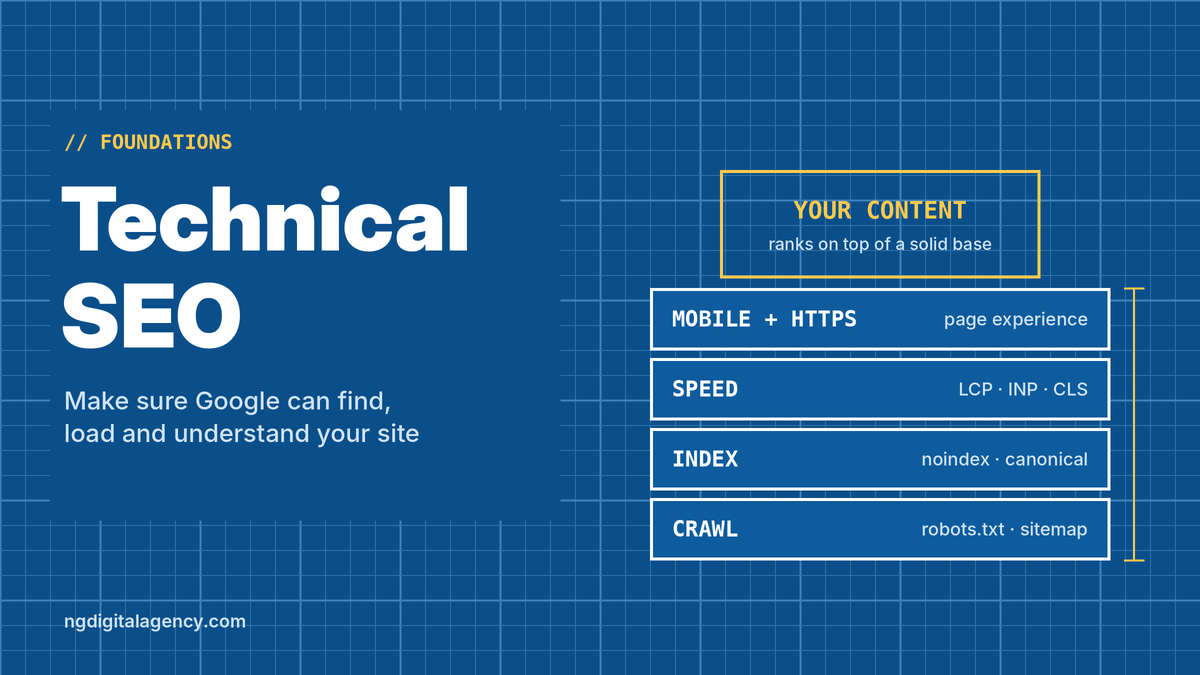


Technical SEO is the work that makes sure search engines can find, load, read and store your website’s pages without problems. It doesn’t change what your pages say; it makes sure Google can actually get to them and understand them.
Think of it as the foundation under your content. If you’re new to SEO, our guide on what SEO is covers the big picture. This one explains each technical area in plain English, what really matters for a typical business site, and what you can safely ignore.
Technical SEO vs on-page vs off-page
| Technical SEO | On-page SEO | Off-page SEO | |
|---|---|---|---|
| Main question | Can Google reach, load and store my pages? | Is this page the best answer? | Do other sites trust me? |
| Examples | Indexing, canonicals, redirects, speed, mobile, HTTPS, sitemaps | Content, titles, headings, internal links | Backlinks, mentions, reviews |
| Usually applies | Site-wide | Page by page | Off your site |
| Who does it | You or a developer | You | You, with others deciding |
This guide covers the technical side. For the other two, see our guides to on-page SEO and off-page SEO.
Why technical SEO matters (and what it can’t do)
Google works in stages: it crawls pages, indexes them, then ranks the best matches for each search. (We explain each stage in how SEO works.) Technical problems break the first two stages. A page Google can’t crawl or index can’t rank, no matter how good it is.
But technical SEO has limits. Google’s page experience guide is clear that good page experience doesn’t guarantee top rankings, and that Google always tries to show the most relevant content, even if its page experience is weaker. A fast, perfectly built site with thin content still won’t win. Technical SEO removes obstacles; it doesn’t replace useful pages.
The six areas of technical SEO
1. Crawlability: can Google reach your pages?
Google finds pages by following links and reading sitemaps. Problems here usually come from:
- robots.txt rules that block important folders by mistake
- Orphan pages that no other page links to
- Server errors (5xx) or pages that time out
An XML sitemap lists the pages you want Google to know about. Most website platforms create one automatically; submit it in Google Search Console and keep it limited to live pages you want indexed.
A note on robots.txt: it controls crawling, not indexing. Google may still index a blocked URL without its content if other pages link to it. To keep a page out of search results, use a noindex tag instead.
2. Indexability: are they allowed in the index?
A page can be crawled and still not indexed. Common reasons:
- A stray
noindextag, often left over from a site redesign or a staging copy - Duplicate or near-duplicate content, where Google picks another URL as the main version
- Thin pages that add little that’s new
The Page indexing report in Search Console shows which URLs aren’t indexed and why. The URL Inspection tool checks a single page.
3. One URL per page: canonicals and redirects
The same page can often be reached at several addresses: with and without “www”, with and without a trailing slash, or with tracking parameters. Google groups these and picks one main version, called the canonical.
You can tell Google which version you prefer. According to Google’s guide to canonical URLs:
| Method | Strength | Use it when |
|---|---|---|
| 301 (permanent) redirect | Strong signal | You’re retiring a duplicate or moved page |
rel="canonical" tag |
Strong signal | Both versions need to stay live (for example, a product in two categories) |
| Listing in the sitemap | Weak signal | As support for the above, not on its own |
Google specifically advises against using robots.txt to handle duplicates.
For redirects, point every old URL straight to its final destination. Chains of redirects (A to B to C) slow things down and waste crawl effort.
Duplicate URLs on your own site aren’t a penalty; they’re just inefficient. Fixing them makes sure links and signals land on one page instead of being split.
4. Site structure and internal links
A clear structure helps both visitors and crawlers. Important pages should be easy to reach from your main navigation or other strong pages, and related pages should link to each other with descriptive anchor text.
A simple structure for a local service business might be: homepage, service pages, location pages, and a blog that links to the relevant services. Breadcrumbs help on larger sites.
5. Speed and Core Web Vitals
Core Web Vitals are Google’s measures of real-world loading, responsiveness and stability. Google’s Core Web Vitals page gives these targets:
| Metric | What it measures | Good |
|---|---|---|
| Largest Contentful Paint (LCP) | How quickly the main content appears | Within 2.5 seconds |
| Interaction to Next Paint (INP) | How quickly the page responds to taps, clicks and typing | Under 200 milliseconds |
| Cumulative Layout Shift (CLS) | How much the layout jumps while loading | Under 0.1 |
INP replaced First Input Delay (FID) in 2024, so ignore guides that still list FID.
Google recommends good Core Web Vitals and says they align with what its ranking systems reward, but they’re one factor among many. The usual fixes are practical: compress and resize images, use modern formats like WebP, remove plugins and scripts you don’t need, and choose decent hosting.
6. Mobile, HTTPS and page experience
Mobile. Google uses the mobile version of your site for indexing and ranking, known as mobile-first indexing. Google’s mobile-first indexing guide recommends that your mobile pages have the same main content as desktop, and that you don’t hide important content behind taps or swipes, because Googlebot doesn’t click or swipe to load it. You can use accordions or tabs to tidy the layout, as long as the content is still on the page.
HTTPS. Serve every page over a secure connection. Most hosts include a free certificate. Make sure HTTP addresses redirect to HTTPS.
Intrusive pop-ups. Avoid pop-ups that cover the content, especially on mobile.
Extras that help: structured data and JavaScript
Structured data (schema markup) is code that describes your page in a standard format: your business details, products, reviews, events or articles. It helps Google understand the page and can make it eligible for rich results, such as product prices or event dates in search. Rich results are never guaranteed, and Google has narrowed which types it shows over the years, so add schema that accurately describes your page rather than chasing a specific display.
JavaScript. Google can render JavaScript, but sites that load all their content with scripts can still cause problems. If key text or links only appear after scripts run, check with URL Inspection that Google sees them.
What most small sites can ignore
Some technical topics get attention far beyond their impact on a normal business site:
- Crawl budget. It mainly matters for very large sites with huge numbers of URLs. A 50-page business site doesn’t need to manage it.
- Chasing a perfect 100 score in PageSpeed Insights. Aim for “good” Core Web Vitals for real users, then move on.
- Sitemap priority and change-frequency tags. Getting the URL list right matters far more.
- Rebuilding the site for technical SEO alone. Most platforms handle the basics well. Fix specific problems instead.
Example: a dental clinic’s technical fixes
Here’s an illustrative example. A dental clinic in Phoenix redesigned its website, and within a few months organic calls dropped. A technical review found four problems:
- The new “Dental Implants” page had a
noindextag copied over from the developer’s staging site. Removing it got the page back in Google within weeks. - Old page URLs returned 404 errors. Several had links from local news and the dental association. Each was redirected to its closest new page.
- The site loaded at both
http://andhttps://www.addresses. A single redirect rule now sends every version to one HTTPS address. - The homepage slider used huge images, giving a slow LCP on phones. Compressed WebP images and a static hero image brought it into the “good” range.
None of these changed a word of content. They simply let Google find, trust and show the pages the clinic already had.
Free tools to check your technical SEO
| Tool | What it shows |
|---|---|
| Google Search Console: Page indexing | Which pages are indexed, which aren’t, and why |
| Google Search Console: URL Inspection | Whether one page is on Google, its canonical, and how Google renders it |
| Google Search Console: Core Web Vitals and HTTPS reports | Speed and security issues from real users |
| PageSpeed Insights | Core Web Vitals for a single page, with suggested fixes |
| A site crawler (many have free versions) | Broken links, redirect chains, missing titles, orphan pages |
For a step-by-step way to use these, follow our SEO audit checklist. It walks through each report in order and shows what to fix first.
Do it yourself or hire help?
Many technical checks are quick to do yourself in Search Console. Fixes like removing a noindex tag, submitting a sitemap or compressing images are usually manageable on WordPress or Shopify.
It’s worth getting help when problems involve server settings, complex redirects, JavaScript-heavy sites, or a site migration. A wrong redirect rule can affect every page at once.
If you want a clear list of what’s wrong and what to fix first, our SEO audit covers technical, on-page and content issues and orders the fixes by expected impact.
FAQs
What is technical SEO in simple words?
Technical SEO means making sure search engines can reach, load and understand your website. It covers things like indexing, site speed, mobile-friendliness, secure connections and avoiding duplicate URLs.
What’s the difference between technical SEO and on-page SEO?
Technical SEO is about how your site is built and served, and usually applies to the whole site. On-page SEO is about the content and wording of each individual page.
Is technical SEO hard to learn?
The basics aren’t. Most small business owners can check indexing, sitemaps, speed and mobile issues in Google Search Console. Server configuration, migrations and JavaScript problems are where a developer helps.
Are Core Web Vitals a ranking factor?
Google recommends good Core Web Vitals and says they align with what its ranking systems reward, but they’re one of many factors. Relevant, helpful content still matters more.
How often should I check technical SEO?
Glance at Search Console’s indexing and Core Web Vitals reports monthly, and do a fuller check after any redesign, migration, new plugin or theme change.
Does every page need to be indexed?
No. Thank-you pages, internal search results, login pages and thin tag pages often shouldn’t be. What matters is that the pages you want to rank are indexed.
The short version
Technical SEO makes sure Google can crawl, index and properly load your pages. Get the basics right: important pages indexed, one URL per page, a clear structure, good Core Web Vitals, a mobile version with the full content, and HTTPS everywhere. Then focus on content and links.
Once your site’s foundations are solid, links have more to work with. Start with an SEO audit, then see how our guest posts work on traffic-checked websites.