

Keyword research is the process of finding the words and phrases people type into Google when they look for what you offer. Done well, it tells you which pages to create, what to call them, and which searches your site has a real chance of winning.
The goal isn’t the biggest keyword you can find. It’s the right keyword: one that real customers search, that matches what your page offers, and that your site can actually rank for. This guide shows you how to find those, step by step, mostly with free tools.
If you’re new to SEO, our guide on what SEO is gives you the big picture first.
What keyword research means
Google’s own documentation on Google Trends describes keyword research as identifying the words and phrases your audience uses to search for the information you offer. That’s the whole idea. You’re learning your customers’ language, then building pages around it.
A keyword is simply a search query. “Roof repair”, “how much does a new roof cost” and “roofer near me” are all keywords, and each one tells you something different about the person typing it.
Keyword types you’ll come across
| Type | Example | What it usually means |
|---|---|---|
| Short-tail (head) | roof repair | Broad, very competitive, mixed intent |
| Long-tail | how to tell if roof damage is covered by insurance | Specific question, less competition, clear intent |
| Local | roof repair Charlotte NC | Someone ready to hire nearby |
| Branded | Smith Roofing reviews | Already knows the business |
| Question | how long does a shingle roof last | Wants an answer, often early in the buying journey |
Most small sites win first with long-tail and local keywords. They bring fewer searches each, but the people searching know exactly what they want.
Why keyword research matters for a small business
Without keyword research, you end up writing in your own words instead of your customers’. A dentist might write “endodontic therapy” while patients search “root canal”. The page can be excellent and still never get found.
Good keyword research helps you:
- Create pages people are already looking for, instead of guessing
- Pick battles you can win, so new content isn’t buried behind national brands
- Match the page to the searcher’s goal, which is how Google decides relevance (we explain this in how SEO works)
- Avoid two of your own pages competing for the same search
The four kinds of search intent
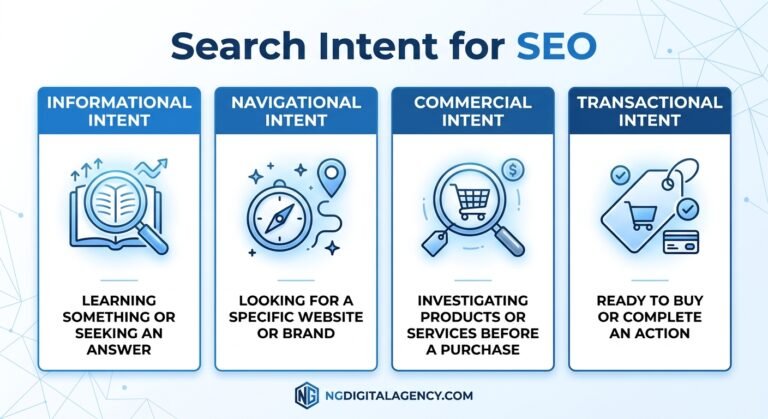
Search intent is the reason behind a search. It decides what kind of page can rank, so check it before you write anything.
| Intent | Example search | Page that tends to rank |
|---|---|---|
| Informational | how to find a roof leak | Guide or how-to article |
| Commercial investigation | metal roof vs shingles | Comparison or buying guide |
| Transactional | roof replacement quote | Service page with pricing and a form |
| Navigational | Smith Roofing login | The brand’s own page |
If every top result for a keyword is a service page, a blog post won’t rank there, however good it is. Match the format first.
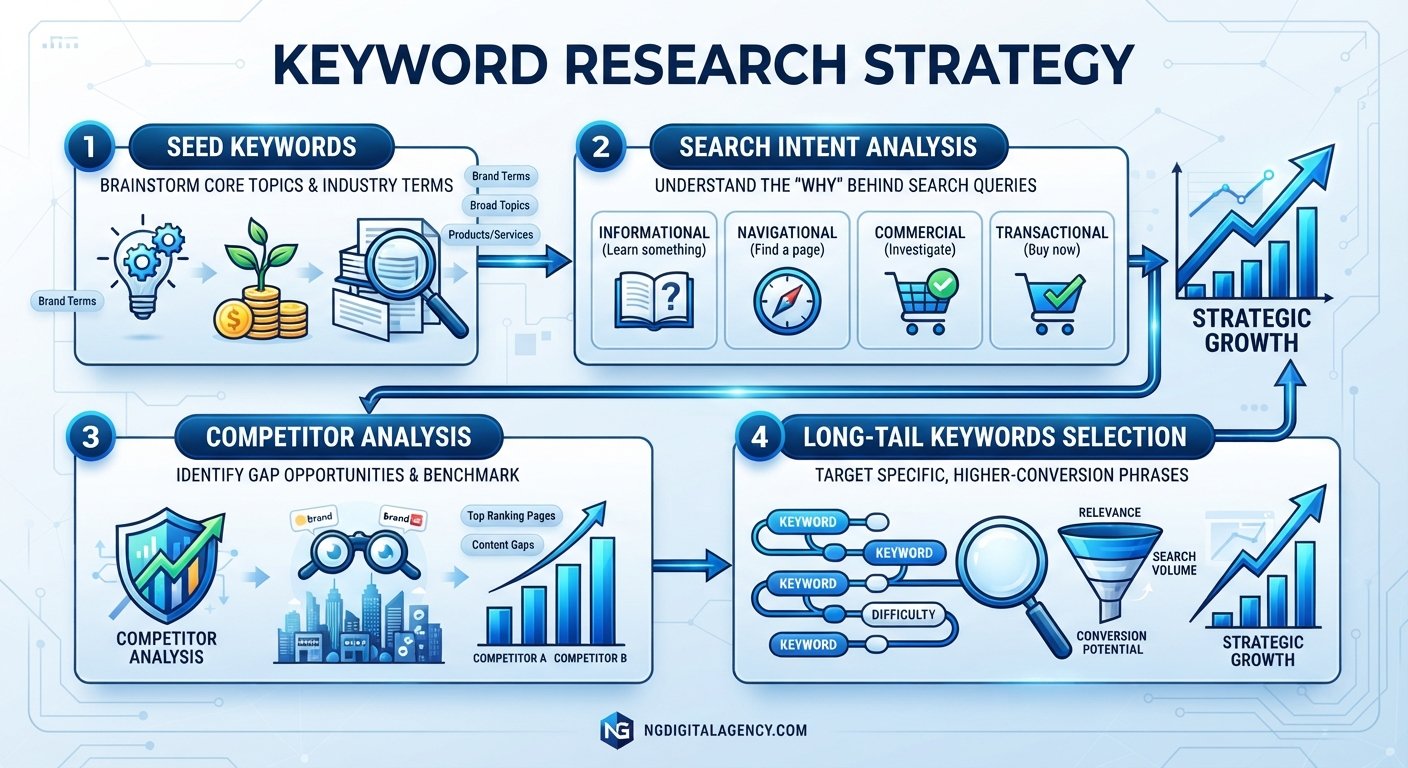
How to find the right keywords in 6 steps
Step 1. Start with what you already rank for
If your site has been live for a few months, your best keyword ideas are already in Google Search Console. The Performance report shows the queries that bring people to your site, plus impressions, clicks, click-through rate and average position.
Sort by impressions and look for queries where you appear but rarely get clicked, often at positions 8 to 20. These are searches Google already connects with your site. A better page, or a dedicated one, can often move them up faster than starting from zero.
Step 2. List seed topics in your customers’ words
Seed keywords are the broad starting points: your services, products and the problems you solve. Write down 10 to 20 of them.
The best sources aren’t tools. They’re the questions customers ask on the phone, in emails, in reviews and at the counter. Google’s SEO Starter Guide makes the same point: people who know a topic well often search with different words than beginners do, so write for how your readers actually talk.
Step 3. Expand your list with free tools and Google itself
Now turn each seed into a longer list:
- Google’s search box. Type a seed and note the autocomplete suggestions. Then check “People also ask” and “Related searches” on the results page.
- Google Keyword Planner. It suggests related keywords and estimates monthly searches. According to Google’s help page, you need a Google Ads account with billing information entered before you can use “Discover new keywords”. You don’t have to run ads, and the numbers are estimates, so use them to compare keywords.
- Google Trends. Shows whether interest in a term is rising, falling or seasonal. It’s based on a sample of searches, so read it as relative interest, not exact counts.
- Paid tools such as Ahrefs or Semrush, if you have them. They add keyword difficulty scores and show what competitors rank for.
Put everything in one spreadsheet with columns for keyword, intent, rough volume and notes.
Step 4. Check intent by reading the results page
For each promising keyword, search it yourself (ideally in a private window) and look at the first page. Ask:
- What kind of pages rank: guides, service pages, product pages, videos, a map?
- Are the results local businesses or national brands?
- What do the top pages cover that yours would need to cover too?
This five-minute check prevents the most common mistake in keyword research: writing the wrong type of page.
Step 5. Judge whether you can realistically rank
Search volume and difficulty scores from tools are estimates, and different tools often show very different numbers for the same keyword. Use them to compare keywords, not as facts.
The results page itself is the better test. A small site has a realistic chance when you see:
- Forum threads, thin pages or outdated posts in the top ten
- Other small or local businesses ranking
- Results that don’t fully answer the question
If the whole first page is national brands and major publishers, look for a longer, more specific version of the keyword instead.
Step 6. Map one main keyword to one page
Give each important page one main keyword, plus a few close variations that mean the same thing. “Roof replacement cost” and “how much is a new roof” belong on one page; “roof repair” needs its own.
A simple keyword map stops two pages from competing for the same search and shows you which pages still need to be written. If that list turns out longer than your time, our team writes researched articles with a keyword brief for each one.
When the page is ready, use the keyword where it matters: in the title, the main heading and naturally in the content. Our on-page SEO guide covers that part.
Worked example: a roofing company in Charlotte
Here’s an illustrative example of the six steps in action.
A family-run roofing company in Charlotte, North Carolina, has a homepage, a services page and a contact page. Almost all its leads come from referrals.
- Search Console shows impressions for “roof leak repair Charlotte” at an average position around 15, with almost no clicks. There’s no page about leak repair; Google is guessing with the services page.
- Seed topics from customer calls: roof repair, roof replacement, storm damage, insurance claims, gutters.
- Expanding in Google shows questions like “does homeowners insurance cover roof leaks” and “how long does a roof replacement take”.
- Reading the results for “roof replacement Charlotte” shows local service pages and a map, so that keyword needs a service page, not a blog post.
- Difficulty check: the insurance question shows forum threads and generic national articles. A local roofer with real claim experience can beat those.
- The keyword map looks like this:
| Main keyword | Intent | Page |
|---|---|---|
| roof leak repair Charlotte | Transactional, local | New service page: /roof-leak-repair/ |
| roof replacement Charlotte | Transactional, local | Existing services page, rewritten and renamed |
| does homeowners insurance cover roof leaks | Informational | New guide |
| how long does a roof replacement take | Informational | Section on the replacement page plus FAQ |
| storm damage roof inspection | Transactional | New service page |
Nothing here needs an expensive tool. The company now knows exactly which five pages to build or fix, and why each one exists.
Free vs paid keyword research tools
| Tool | Cost | Best for | Limits |
|---|---|---|---|
| Google Search Console | Free | Queries you already appear for | Only shows your own site’s data |
| Google autocomplete and “People also ask” | Free | Real phrasing and questions | No volume numbers |
| Google Keyword Planner | Free with a Google Ads account | Keyword ideas and volume estimates | Billing setup required; built for ad planning |
| Google Trends | Free | Seasonality and rising topics | Relative interest, not search counts |
| Ahrefs, Semrush, Moz | Paid subscriptions | Difficulty scores, competitor keywords | Estimates vary between tools |
Start with the free tools. Upgrade when you’re publishing regularly and need competitor data at scale.
Common keyword research mistakes
- Chasing the biggest number. A high-volume keyword with mixed intent can bring visitors who never buy.
- Skipping the results page. Tools can’t tell you what format Google prefers. Looking can.
- Targeting one keyword with several pages. Your pages end up competing with each other.
- Stuffing keywords into the page. Repeating a phrase over and over is keyword stuffing, which is against Google’s spam policies. Google’s systems understand synonyms and related terms, so write naturally.
- Treating tool numbers as facts. Volume and difficulty are estimates. Use them to compare, then test with real content.
- Researching once and stopping. Check Search Console every month for new queries your pages are starting to appear for.
FAQs
What is keyword research in simple words?
Keyword research means finding out what words people type into Google when they look for what you offer. You then create or improve pages around those words so the right people can find you.
How do I find keywords for my website for free?
Start with Google Search Console to see queries you already appear for. Then use Google autocomplete, “People also ask”, Google Trends and Google Keyword Planner to expand your list. Check each keyword’s results page to confirm intent.
How many keywords should I target per page?
Give each page one main keyword and a few close variations that mean the same thing. If two keywords need different answers or different page types, they need separate pages.
What is a long-tail keyword?
A long-tail keyword is a longer, more specific search, such as “how to tell if roof damage is covered by insurance”. Each one gets fewer searches, but competition is usually lower and the searcher’s goal is clearer.
Is Google Keyword Planner free?
The tool itself doesn’t charge, but Google requires a Google Ads account with billing information before you can get keyword ideas. You don’t need to run ads to use it, and its search volumes are estimates.
How often should I do keyword research?
Do a full round when you plan a new site section or content calendar. After that, check Search Console monthly for new queries and adjust pages as your rankings grow.
The short version
Keyword research is learning how your customers search, then building one clear page for each thing they’re looking for. Start with Search Console and free Google tools, check the results page before you write, and pick keywords your site can realistically win.
Once those pages are live and answering searches well, links from relevant websites help them climb further. See how our guest posts work on real, traffic-checked sites, with sponsored link marking available on every order.