

If you’ve read our guide on what SEO is, you know it’s the work of getting your website found in search without paying for every click. This article goes one level deeper: what actually happens inside a search engine between the moment you publish a page and the moment it shows up, or doesn’t, on Google.
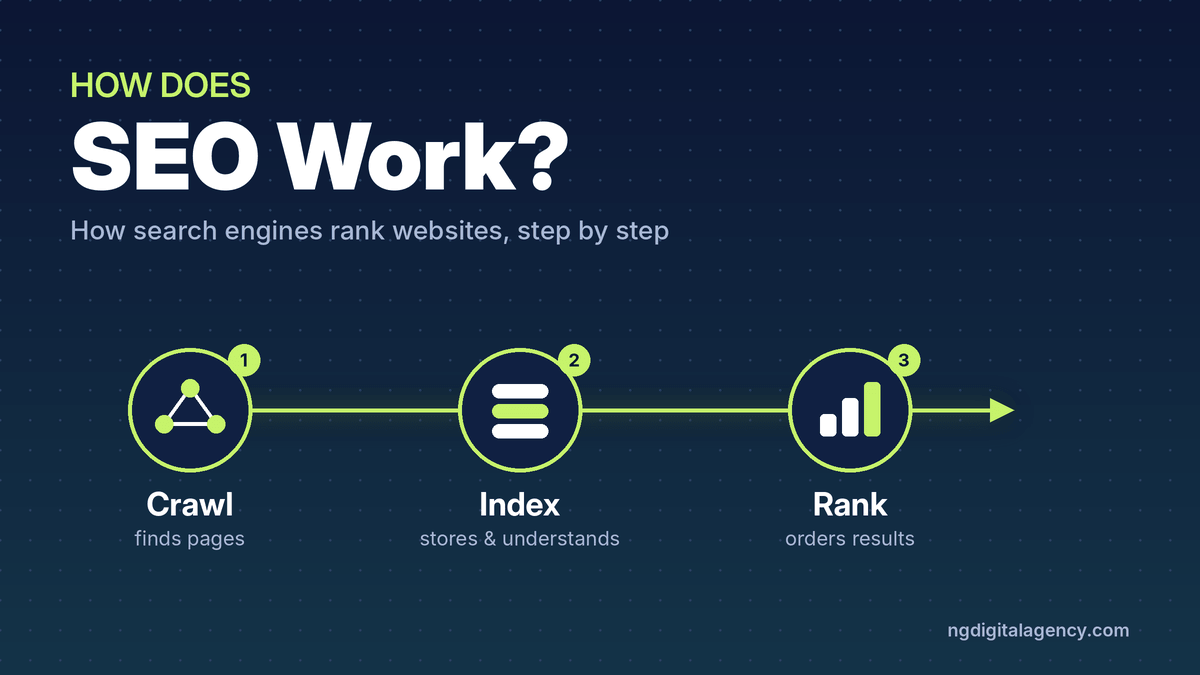
The short version: SEO works by making your pages easy for search engines to find, easy to understand, and the most useful answer for a specific search. Google does the rest in three stages: it crawls the web, indexes what it finds, and ranks the best matches when someone searches.
The short answer: SEO works in three stages
Google doesn’t search the live internet when you type a query. It searches its own stored copy of the web, which it builds and updates constantly. Every page goes through the same pipeline, and a page can drop out at any stage.
| Stage | What Google does | What can stop your page | What SEO does about it |
|---|---|---|---|
| 1. Crawling | Finds the page and downloads it | No links pointing to it, blocked by robots.txt, server errors | Internal links, a sitemap, a healthy server |
| 2. Indexing | Reads the page and stores it in its database | noindex tag, thin or duplicate content, content hidden behind scripts | Clear, original content and one main URL per page |
| 3. Ranking | Picks and orders the best pages for each search | Weaker relevance, quality or usability than other pages | Better answers, trust signals, fast mobile pages |
The rest of this article walks through each stage.
Stage 1: Crawling, how Google finds your pages
There’s no central list of every page on the internet, so Google has to discover them. It uses automated programs called crawlers (Google’s main one is Googlebot) that visit known pages and follow the links on them to find new ones.
That’s why links matter so much. A new blog post linked from your homepage or category page gets found quickly. A page nobody links to, often called an orphan page, may never be found at all.
You can help Google discover pages in two ways:
- Links. Internal links from your own pages, and links from other websites.
- A sitemap. A file listing the URLs you want crawled, which you can submit in Google Search Console.
Google also controls how fast it crawls so it doesn’t overload your server. If your site responds with errors, Google slows down. During the crawl, Google renders the page much like a browser does, including running JavaScript, so it can see content that loads after the page opens.
Stage 2: Indexing, how Google understands and stores them
After crawling a page, Google tries to work out what it’s about. It reads the text, the <title> element, headings, image alt text, and any images or video on the page.
Google also checks whether the page is a copy of another page. When several pages look the same, it groups them and picks one main version, called the canonical, to show in results. The others are treated as alternate versions.
Everything Google learns is stored in the Google index, a huge database spread across thousands of computers. Only indexed pages can appear in search results.
Why some pages never get indexed
Google states plainly that indexing isn’t guaranteed. The usual reasons are:
- Low-quality or thin content that adds nothing new
- A
noindexrule telling Google to skip the page, often left over from a redesign or staging site - A site design that makes content hard to read, such as text that only appears after complex scripts run
If you suspect a page isn’t indexed, the URL Inspection tool in Search Console will tell you. Our SEO audit checklist shows how to check this and fix the common causes.
Stage 3: Ranking, how Google decides the order
When someone searches, Google pulls the matching pages from its index and ranks them, all in a fraction of a second. Google does not accept payment to rank a page higher. Organic order is decided by its automated systems.
The five things Google weighs for every search
Google’s own explanation of how results are ranked groups its signals into five areas.
- Meaning. First, Google works out what the searcher really wants. It corrects spelling, understands synonyms, and reads clues in the query. “Cooking” suggests recipes. “Pictures” suggests images. “Pizza” suggests places nearby.
- Relevance. Next, it looks for pages that actually contain information on that topic. The most basic signal is whether the page uses the words people search, especially in headings and body text. Repeating a keyword over and over doesn’t help; it’s treated as spam.
- Quality. Among relevant pages, Google favors ones that show expertise, authority and trustworthiness. One strong sign is when other well-known sites link to or reference the content.
- Usability. When other signals are close, pages that are easier to use can win: pages that load quickly and work well on a phone.
- Context. Finally, Google adjusts for the person searching: their location, language, settings and, in some cases, their search history.
The ranking systems behind the scenes
Those five factors are carried out by many separate systems. Google publishes a guide to its ranking systems. Here are the ones that matter most to a typical business site, in plain English.
| System | What it does | What it means for you |
|---|---|---|
| BERT and neural matching | Understand the meaning of words in context, and match concepts in a query to concepts on a page | Write naturally for people; you don’t need every keyword variation |
| RankBrain | Relates words to concepts, so a page can rank without the exact search phrase | Cover the topic properly instead of repeating one phrase |
| Passage ranking | Judges individual sections of a long page | A clear section can rank for a narrow question even inside a long guide |
| Link analysis and PageRank | Uses links between pages to understand topics and usefulness | Links from relevant, respected sites still count |
| Freshness | Shows newer content when the search needs it | Keep time-sensitive pages updated |
| Original content | Favors the original source over pages that copy or summarize it | Publish your own data, photos and experience |
| Spam detection | Finds and removes spam, including link spam and keyword stuffing | Shortcuts can sink a site |
Google has also folded older systems into its core ranking. Panda (content quality) and Penguin (link spam) have been part of the core for years. The helpful content system, which rewarded content made for people rather than search engines, joined the core in March 2024.
Why the same search shows different results
Ranking isn’t one fixed list. Google’s own example: someone searching “football” in Chicago is likely to see American football and the Bears, while someone in London is likely to see soccer and the Premier League.
The same goes for a search like “roof repair”. A homeowner in Phoenix and one in Boston see different local companies, and on a phone they may see a map first. That’s why checking your own rankings by typing searches into your browser can mislead you. Search Console shows how your pages actually perform across all searchers.
Following one page from publish to page one
Here’s an illustrative example that ties the stages together.
A roofing company in Denver publishes a new page: “How Much Does a Roof Replacement Cost in Denver?”
- Crawl. The page is linked from the company’s main navigation and its blog, and it’s in the sitemap. Googlebot finds it within days.
- Index. Google reads it and sees a clear title, costs broken down by roof type, local permit details and photos of real jobs. It’s not a copy of anything else, so it’s indexed.
- Meaning and relevance. For “roof replacement cost Denver”, Google understands the searcher wants local prices. The page answers that in its first section.
- Quality. A local home-improvement blog and the regional builders’ association link to the page. Google reads those as signs of trust.
- Usability and context. The page loads quickly on a phone. Searchers in Denver are the ones most likely to see it.
Over the following weeks, the page climbs for that search and dozens of related ones, like “how much is a new roof in Colorado”. Nothing in this story is a trick. Each step simply removes a reason for Google to pass the page over.
What you can control, and what you can’t
SEO doesn’t control Google. It improves your odds in the areas Google weighs.
| You can control | You can influence | You can’t control |
|---|---|---|
| Whether pages can be crawled and indexed | Which sites link to you | Google’s algorithms and updates |
| What your pages say and how well they answer searches | Reviews and mentions of your business | What competitors publish |
| Titles, headings, internal links | How quickly Google recrawls a page | Each searcher’s location and settings |
| Page speed and mobile experience | Whether Google shows ads, maps or AI answers above you |
This is also why nobody can honestly guarantee a ranking. Focus on the first two columns and measure the results.
What doesn’t move rankings
A few things get a lot of attention but do little or nothing, according to Google’s SEO Starter Guide:
- The meta keywords tag. Google doesn’t use it.
- A keyword in your domain name. It has hardly any effect beyond showing in breadcrumbs.
- A magic word count. Length alone doesn’t affect ranking.
- Third-party scores. Domain Authority, Domain Rating and Trust Flow come from SEO tools. They can help you compare sites, but Google doesn’t use them.
- Paying Google. Ads appear in labeled spots; they don’t lift your organic position.
Buying links is worse than useless if they pass ranking credit. Google’s spam policies treat that as link spam. Paid placements, including sponsored guest posts, should carry rel="sponsored" or rel="nofollow".
How long it takes for SEO to work
Google says some changes show up within hours and others take several months, and recommends waiting a few weeks before judging a change. Fixing a page that wasn’t indexed can pay off quickly. Earning enough trust to outrank established competitors for a busy keyword takes much longer.
The best way to track progress is Google Search Console. Watch impressions first (Google is showing your page more), then average position, then clicks.
If you want a clear view of what’s holding your site back at each stage, our SEO audit checks crawling, indexing, on-page and speed issues and lists fixes in order of impact.
FAQs
How does Google decide which website ranks first?
Google ranks pages using automated systems that weigh meaning, relevance, quality, usability and context for each search. The page that best answers that specific searcher, at that moment and place, tends to rank first.
Does Google crawl every page on the internet?
No. Google only crawls pages it can discover and access. Pages with no links, pages behind logins and pages blocked by robots.txt may never be crawled.
What’s the difference between crawling and indexing?
Crawling is Google finding and downloading a page. Indexing is Google analyzing the page and storing it in its database. A page can be crawled and still not indexed.
Are backlinks still important for SEO?
Yes. Google still uses links to understand topics and trust, and PageRank remains part of its systems. One link from a relevant, respected site is worth far more than many from low-quality sites.
Can I pay Google to rank higher?
No. Google doesn’t accept payment for organic rankings or crawling. You can buy ads, but they appear in separate, labeled spots.
How do I know if Google has indexed my page?
Paste the page’s URL into the URL Inspection tool in Google Search Console. It tells you whether the page is on Google and, if not, why.
The short version
SEO works by helping search engines do three jobs: find your page, understand it, and see it as the most useful answer for the right searches. Make sure every important page can be crawled and indexed, answer real questions clearly, earn trust from relevant sites, and keep pages fast on mobile.
Ready to grow your site’s authority? Start with an SEO audit, then see how our guest posts work on traffic-checked websites.