

Guest posting outreach is the process of finding websites that publish articles from outside writers, pitching an editor a topic they want, and getting a published article with a link back to your site. Done well, it sends relevant readers to your pages and adds a link from a site your audience already trusts.
It works best when the site has real readers in your niche, the article helps those readers, and any paid link is marked the way Google asks. This guide walks through each step, from building a prospect list to tracking results after the article goes live.
What guest posting outreach involves
Outreach has three parts: finding sites, pitching editors, and getting an article accepted and published. Each part fails in a different way. Weak prospects waste your pitches. Generic pitches get ignored. Articles that read like ads get rejected even after a yes.
The basics of what a guest post is cover how the options differ. This guide assumes you know that and focuses on getting one published. A related tactic, link insertion, adds your link to an existing article; see what is link insertion.
Step 1: Set the goal and pick the page you want to support
Before you search for a single site, decide which page the link should support. Pointing a guest post at your homepage is a weak choice if you want more calls about one specific service.
Write down three things:
- The page the link will point to, such as a service page or an in-depth guide.
- The reader you want to reach, such as homeowners or small business owners.
- The question your page answers that the host site’s readers would also want answered.
A dental clinic in Phoenix might choose its guide to dental implant costs as the target page. Its reader is a local adult researching options. The guest post topic has to match that search. It should teach something useful, not sell the clinic.
State the value you offer the host’s readers in one sentence, and check that it matches their audience before you reach out.
Step 2: Build a prospect list
Start with search, then add competitor signals. Good sources include:
- Search strings that pair your topic with phrases like “write for us,” “guest post,” or “become a contributor.”
- Guest posts by writers already active in your niche.
- The backlink profiles of competitors, filtered for guest posts or author bios.
- Sites that already link to articles on your topic.
Also check existing resource pages that link to useful outside guides, and analyze the bylines of regular contributors in your niche. Record every site in a tracker sheet with its source and the date you found it.
Each source gives different results. Search strings find sites that say they accept contributions, which means more competition for the same editors. Competitor backlinks find sites that already published in your niche, which is often a stronger signal. Keep a spreadsheet with the site URL, where you found it, and the date.
Many “write for us” pages are crowded with pitches. A site that does not advertise contributions may still accept a strong, specific idea. Check its recent articles to see whether it publishes outside writers.
Step 3: Qualify each site
Before you pitch, check whether the site has real readers. Four checks catch most problems:
- Traffic trend. Look at organic traffic over the last two years in Ahrefs or Semrush. A steady or rising line is better than a spike followed by a drop.
- Audience location. If you target US readers, most visitors should be in the US.
- Topic fit. Recent articles should cover subjects your readers care about.
- Outbound links. Sites that link out to unrelated sellers on every page are often selling links in bulk.
Domain Rating alone does not prove people read a site. A high score with almost no traffic is a warning sign. For the full set of checks, read how to check if a guest post site has real traffic.
Link farm red flags
Use this checklist before you pitch or pay. A site that matches several items should be skipped or checked more closely.
- Ranks for thousands of keywords, but its traffic comes from one or two pages or shows little sign of readers.
- The homepage mixes unrelated niches, such as crypto and fashion, with no clear theme.
- Most posts link out to casinos, loan sellers or unrelated shops.
- Articles have no named author, look templated, or read as spun or unedited AI text.
- Visitors come from countries the site never writes about.
- Organic traffic shows a sharp spike followed by a drop.
- The site sells placements in bulk with identical anchor text across many posts.
- The owner will not share any proof of traffic, such as a Search Console screenshot.
Some signals, such as real engagement, are hard to measure from outside. Treat this list as a screen, then read the articles yourself.
Step 4: Find the right person to email
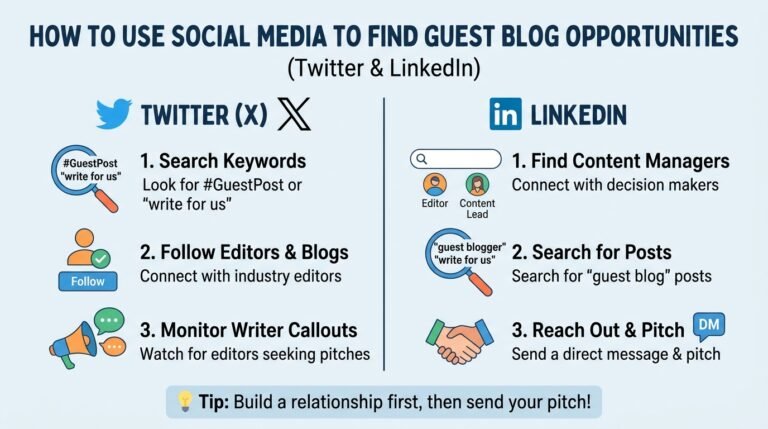
Pitch the person who makes the decision. On small sites that is often the owner. On larger sites it may be an editor, a head of content, or a managing editor. Check the about or team page, then search for the person on LinkedIn or X to confirm their role. Our guide on how to find guest blog opportunities on Twitter and LinkedIn shows which searches to run on each platform.
Use an email finder to confirm an address you have already identified, not to guess one. If the site publishes contributor guidelines, follow them exactly, including any submission form or the email address it asks for.
Email finding tools
Use a finder to confirm a decision-maker’s address, then verify it before you send. Common options include:
- Hunter.io finds addresses tied to a company domain and can check whether an address looks valid.
- Voila Norbert finds an address from a person’s name and the site’s domain.
- RocketReach lists contact details for many professionals, including editors and content leads.
Check current pricing and features on each vendor’s site. Verify every address before the first send. Bounced addresses can hurt your sender reputation.
Warm up the editor before you pitch
A short, genuine interaction before the email makes your name familiar. Spread it over a few days rather than doing it all at once.
- Follow the editor on LinkedIn or X, and read their recent posts.
- Comment on one post with a specific point, such as a detail from an article they published. Skip generic praise.
- Share one of the site’s articles with credit to the author, if it fits your audience.
- Send the pitch after one or two days of real engagement, and mention it in one line.
Do not comment on every post or send the same comment to several editors. That reads as automation.
LinkedIn InMail template
Use this when you have LinkedIn but no verified email. Keep it under about 100 words.
Hi [First name], I read your piece on [specific article title], and the point about [specific detail] stayed with me. I have an idea for your readers on [topic]: [one-sentence angle]. Would a short outline be useful?
[Your name]
If you have no connection and no InMail credits, send a short connection note with one sentence of context instead.
Step 5: Write a pitch that gives the editor a reason to reply
Editors get many pitches. A good pitch makes the decision easy. It has five parts:
- A specific subject line that names the site’s topic or a recent article.
- One line of context that shows you read the site. Name a real article and say what worked in it.
- Two or three topic ideas, one sentence each. Each idea should fit the site’s existing coverage and show the reader’s benefit.
- One line about you that shows you know the topic, such as your role or a result you have measured.
- A clear ask, such as asking which idea fits the editor’s plan.
Here is a short example for the dental clinic:
Subject: An idea for your dental care series
Hi [First name],
I enjoyed your recent piece on choosing a dentist for children. Your point about asking about sedation options was practical.
I think your readers would also find these useful:
- How to compare dental implant quotes without comparing apples to oranges
- What to ask before a same-day crown appointment
I manage a dental office in Phoenix and can write either piece with clinical review. Would one of these fit your editorial plan?
[Your name]
Keep the pitch short. Editors often read on a phone. Never send a pitch that could have gone to any other site, and only make claims you can support.
AI prompts for personalized intros
AI can read a prospect’s article faster than you can. Use it to draft one intro sentence, then check it. AI can invent details.
Paste the article text into a chat and use a prompt like this:
You are helping me pitch a guest post. Read the article below. In one sentence of no more than 25 words, name one specific point the author made and say why it matters to their readers. Do not use flattery. Do not invent facts that are not in the article.
[Paste article text]
After the model writes the sentence, read the original article yourself and confirm the point. Edit the sentence until it sounds like you.
AI prompts for topic ideas
Use AI to brainstorm topics that fit a host site’s audience. Give it the site’s recent headlines and a description of its readers.
Here are recent article titles from [site name], which serves [audience description]: [paste 10 to 20 titles]. Suggest 8 article topics that fit this audience. Do not repeat these titles. For each topic, give a one-line reason a reader would care. Flag any topic that closely overlaps an existing title.
Keep the final choice human. Check each topic against the site’s actual coverage and real search demand.
Subject lines to test
These are starting points. I did not verify open rates for them. Open rates depend on the list, the sender and the timing, so test two or three against each other in your own outreach.
- Quick question about your [topic] article
- Content gap on [Site Name]?
- An idea for your [topic] readers
- Following up on [article title]
- A guest post idea on [specific subtopic]
- [First name], a topic your readers have not seen yet
- Could you use a [topic] guide for [audience]?
- Your piece on [topic] and one missing angle
Pitch styles beyond the standard idea
Content gap pitch. Point to a topic the site covers partly or not at all. Name the gap, explain what the reader would learn, and offer one clear title.
Subject: Content gap on [Site Name]?
Hi [First name], your guide on [existing topic] covers the basics well. I noticed you do not cover [missing subtopic], which readers ask about often. I can write a 1,200-word piece on it with examples. Would that fit?
Infographic pitch. Offer a free visual asset the site can use. Make it original, cite every figure, and confirm you have rights to any image you include.
Hi [First name], I made a one-page visual on [topic] with a source for each figure. It would fit your [article title] or a new piece. I can send the file and a short intro you can use. Would you like to see it?
Step 6: Follow up without pressure
Silence is common. One polite follow-up, sent 4 to 7 days after the first email, is reasonable. Refer to the original topics, add one new useful point, and stop if there is still no reply.
Do not send repeated reminders or change the subject line to look like a new email. If an editor says no, thank them, keep the relationship open, and offer a different topic later.
Automate follow-ups without sounding automated
Sequence tools send follow-ups on a schedule and stop when someone replies. Common options include:
- Lemlist for multi-step sequences, with personalization fields and reply detection.
- Woodpecker for automated sequences and sending controls.
- Pitchbox for outreach workflows built around link-building campaigns.
Set every sequence to stop on any reply. Keep follow-ups to one or two. Check each vendor’s current plans and whether they fit your volume.
For operations over 50 prospects, use automation such as Lemlist, Woodpecker, or Pitchbox to manage sequences safely. Below that size, a manual sequence is often easier to keep personal.
Bulk personalization with merge tags
Merge tags insert a field from your prospect list into each email. Common examples are {{first_name}} and {{recent_post_title}}.
To personalize 100 or more emails without looking like spam:
- Research every row before you send. A tag that points to a made-up or copied title is worse than no tag.
- Set a fallback for empty fields, so the email never reads “Hi ,” or “your article on .”
- Use fields that change the pitch, such as the post title, a specific point, or the editor’s name. Avoid tags that only swap one word.
- Send in batches and keep daily volume moderate, so the sending account stays in good standing.
- Review five random rendered emails before each batch goes out.
If a field cannot be verified, leave it out of the template and write that email by hand.
Step 7: Handle paid placements and link attributes correctly
This is where many outreach campaigns go wrong.
Google’s spam policies do not ban paid guest posts. They treat buying or selling links to pass ranking credit as link spam. The same policies list exchanging goods or services for links, including sending a free product in return for a mention with a link, as link spam when the goal is to manipulate rankings. Advertising and sponsorship are allowed as long as the link is marked.
Google’s spam policies describe link spam, and its guide to qualifying outbound links explains the attribute values. In short:
| Situation | Attribute | Notes |
|---|---|---|
| Paid post or paid placement | rel=”sponsored” | Google’s preferred value for paid links |
| Paid link, flagged the older way | rel=”nofollow” | Still an acceptable way to flag paid links |
| User-generated content such as comments | rel=”ugc” | For forum posts and comments, not editorial articles |
Two practical rules follow. If you pay for a placement, ask for a sponsored or nofollow link. If an editor adds your link because it helps readers, no attribute is needed, but you should not pay for that link. If you would rather not run outreach yourself, see how our guest posts work and check the link type before you order.
Step 8: Write for the host site’s readers
The article has to fit the host site first. Match its tone, length, and formatting. Write the piece the way you would for your own blog, with a clear answer near the top and useful steps in the body.
Place your link where it helps. The best spot is usually in the body, next to a sentence that expands on the point. A link in the author bio is common and acceptable, but it gets fewer clicks because the reader has already finished the article.
Choose anchor text carefully:
- Brand or URL anchors are the safest choice for most links.
- Descriptive anchors, such as “guide to dental implant costs,” read naturally.
- Exact-match keyword anchors are the pattern Google’s policy warns about in paid posts. Use them rarely, if ever.
If you would not want an editor to see the anchor sentence, rewrite it.
Anchor text mix guideline
This is a planning guideline, not a Google rule. Google does not publish an ideal anchor ratio. The goal is a natural mix across your whole backlink profile, not a fixed split for every post.
| Anchor type | Share of anchors | Example |
|---|---|---|
| Brand or URL | About 50% | NextGen Digital, ngdigitalagency.com |
| Partial match | About 35% | guide to dental implant costs |
| Descriptive | About 15% | a practical guide to comparing quotes |
| Exact match | Under 5% | dental implant cost Phoenix |
Track the mix in your backlink tool every quarter. If exact-match anchors rise above the guideline, pause new exact-match orders and write future anchors to be more descriptive.
Step 9: Track replies, links and traffic
Outreach gets better when you measure it. Keep one sheet with these columns:
| Site | Contact | Topic pitched | Date sent | Reply | Live URL | Link type | Referral visits |
|---|---|---|---|---|---|---|---|
| example-site.com | Editor name | Dental implant cost guide | Date | Yes, no, or none | Link to the post | Sponsored or nofollow | From analytics |
Review the sheet monthly. Track which topics get replies and which sites send readers. Expect modest referral traffic. In a survey of 239 guest articles, Ahrefs reports that referral traffic averaged about 50 visits. The value usually comes from relevance, a trusted link, and the audience that arrives with it.
Manage the relationship after publishing
Send a thank-you email on the day it goes live
Send a short thank-you email to the editor when the post is published. Thank them for their edits, mention one reader comment if there is one, and offer to share the post on your own channels.
Hi [First name], thank you for publishing [article title] and for your edits. I am glad it is live. I will share it on [your channels] this week. If a topic that fits your readers comes up, I would love to pitch it.
Then share the post on your channels, tag the editor where appropriate, and reply to comments on the article for a couple of weeks.
Turn a one-time spot into a regular contributor role
A single post is a transaction. A contributor role is a relationship that repeats. To move from one to the other:
- Deliver the first article on time, with clean edits and no surprises.
- Send the editor three or four future topics that fit the site, with one line on each.
- Ask whether the site has a contributor guideline or a standing topic list.
- Agree on a cadence, such as one article per quarter, and keep to it.
- Track reader response to each post and share results with the editor when they are useful to them.
A regular contributor often earns a stronger author bio and a clearer place on the site. That builds lasting authority, but only if each article is worth the editor’s time.
Common mistakes
- Choosing sites by Domain Rating alone. A high score with few readers gives you little.
- Sending the same pitch everywhere. Editors notice generic messages quickly.
- Writing an ad. Articles that exist only to hold a link get rejected or ignored.
- Repeating one keyword anchor. The same exact-match anchor across many sites looks manufactured.
- Leaving paid links unmarked. Mark paid links as sponsored or nofollow.
- Linking to the wrong page. Send readers to the page that continues the idea in the article.
Frequently asked questions
How do I find guest post sites that accept outside writers?
Search your topic with phrases like “write for us” or “contributor guidelines.” Then check competitor backlinks for guest posts in your niche. Qualify each site on traffic, topic fit, and outbound links before you pitch.
How many sites should I pitch at once?
Pitch as many sites as you can personalize well. Mass-sending generic emails usually produces weak results and can hurt your email deliverability. A small, steady batch of tailored pitches beats a large batch of copies.
Is it against Google’s rules to pay for a guest post?
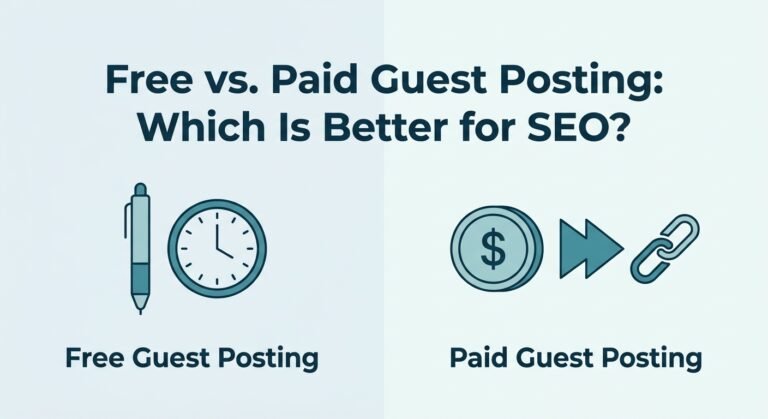
Paying for a guest post is not banned. Google accepts paid links when they are marked rel=”sponsored” or rel=”nofollow”. Paying for links that pass ranking credit, or using optimized anchor text in paid posts, is link spam.
How long does a guest post take to publish?
It varies widely. Some editors reply in days, while others take weeks. Allow time for feedback on your draft, and expect the post to go live after the editor approves it.
What should I do if an editor says no?
Thank them, keep the relationship open, and offer a different topic later. A no is often about timing or fit rather than the writer. Note the reason in your sheet so you do not pitch the same idea again.
Do guest posts still help SEO?
They can, when the host site has real readers in your niche, the article is useful, and paid links are marked correctly. A guest post will not fix a site with technical problems. Check your SEO basics first so the link points to a page that can rank.
The process at a glance
- Set the goal and pick the page you want to support. Identify a specific target page, define your ideal reader, and align your value proposition with the host site’s audience before initiating outreach.
- Build a prospect list. Gather potential sites through search operators, niche contributor analysis, competitor backlink audits, and existing resource pages. Maintain an organized tracker sheet.
- Qualify each site and screen for link farms. Evaluate sites by organic traffic trends, audience geography, and topical alignment. Use the link farm red flags checklist to screen out low-quality networks, spammy outbound links, or sites without genuine human readers.
- Find and warm up the right person. Identify decision-makers, such as content editors or site owners, using tools like Hunter.io, Voila Norbert, or RocketReach. Warm them up with subtle, genuine social engagement, then send a concise LinkedIn InMail or email.
- Write a high-converting pitch. Use a targeted subject line, personalized context, two or three concise topic ideas, and a clear call to action. Use AI prompts to draft natural, research-backed introductions.
- Follow up and automate without pressure. Send one polite follow-up 4 to 7 days after your first email. For operations over 50 prospects, use Lemlist, Woodpecker, or Pitchbox to manage sequences safely.
- Handle paid placements and link attributes correctly. Label commercial or sponsored relationships with rel=”sponsored” or rel=”nofollow”. Do not try to manipulate rankings with undisclosed paid links.
- Write for the host site’s readers and balance your anchors. Match the publication’s tone and depth. Keep brand or URL anchors near 50%, partial-match and descriptive anchors near 35%, and exact-match anchors under 5%.
- Track replies, links and long-term relationships. Monitor live URLs, referral traffic and response status in a master sheet. Turn one-off posts into ongoing collaborations with a thank-you note, social promotion and future topic ideas for editors.
Start with one target page
Guest posting outreach is slow work, but it compounds. Pick one target page, find ten sites that fit, qualify them, and send ten personal pitches. Track what happens, then repeat what worked. For the wider plan, see our beginner’s guide to link building.
If you would rather have sites checked and placements handled for you, see our guest post service.